Filter Subframe Calculator
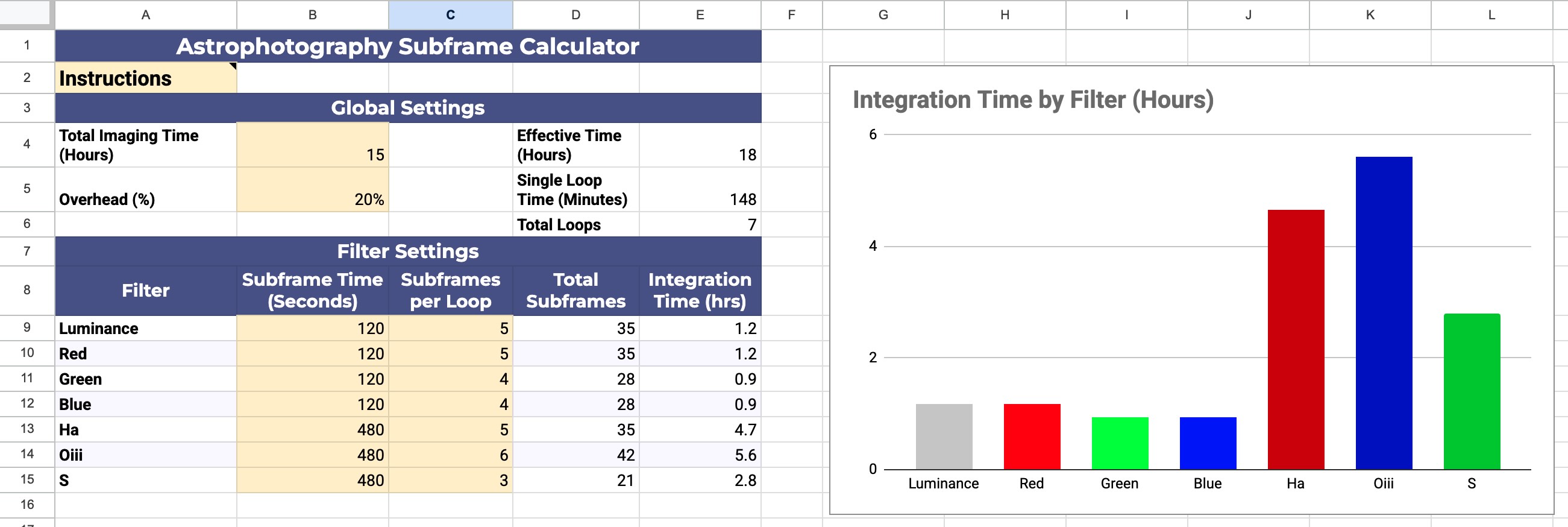
Clear skies are a limited resource. This subframe calculator is designed to streamline the planning of your imaging runs by balancing desired integration times with hardware constraints and overhead requirements. It ensures that your planned sequence fits within your available imaging window while maintaining the correct ratios between your various filters.
Hover over the Instructions cell for help if you need it.
In Global Settings, input your target total imaging time and an estimated overhead percentage to account for time spent on dithering, autofocusing, meridian flips, etc. The sheet calculates the “Effective Time” and the “Total Loops” possible within that window.
In the Filter Settings section, you set the specific exposure times per filter and the number of subframes per loop for each channel. The calculator uses these inputs to display the total integration time per filter.
To use this tool for planning your own imaging runs, you must save your own version to your Google account. Navigate to the File menu and select Make a Copy. This will create a personal, editable spreadsheet in your Google Drive, allowing you to modify exposure lengths and subframe ratios for different targets and equipment profiles.
Clear skies and happy imaging!